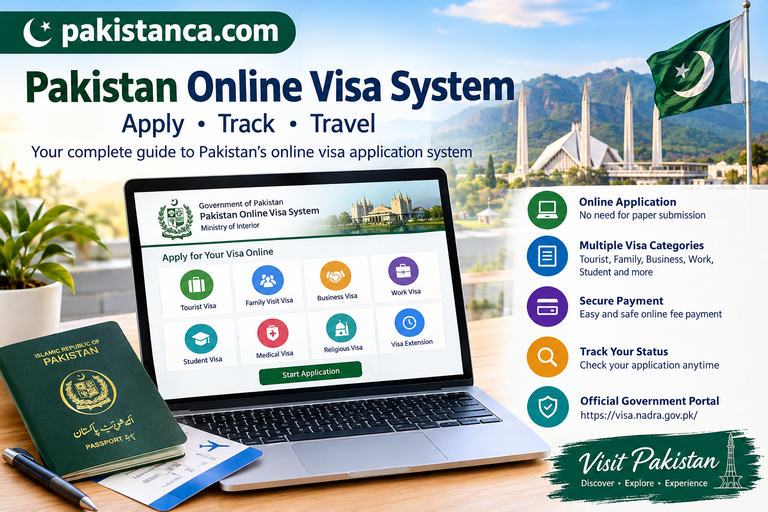

The Pakistan Online Visa System allows eligible foreign nationals to apply for a Pakistani visa through an official online portal. The system supports different visa categories, including tourist, family visit, business, work and student visas. Applicants can complete the application process online, upload the required documents, pay the applicable fee and check their application status.
What Is the Pakistan Online Visa System?
The Pakistan Online Visa System is the Government of Pakistan’s digital visa application platform, operated through NADRA for the relevant government authorities. It helps eligible travellers submit visa applications without starting the process through a paper application at an embassy.
Applicants should use the official website:
Official website: https://visa.nadra.gov.pk/
Always check the latest eligibility requirements, fees and processing information on the official portal before applying.
Pakistan Online Visa Categories
The online visa system provides different categories according to the purpose of travel. Available options depend on the applicant’s nationality and circumstances.
- Tourist or Visit Visa: For eligible travellers visiting Pakistan for tourism or personal visits.
- Family Visit Visa: For eligible foreign family members visiting relatives in Pakistan.
- Business Visa: For foreign nationals travelling to Pakistan for business activities.
- Work Visa: For eligible foreign nationals intending to work in Pakistan.
- Student Visa: For eligible international students planning to study in Pakistan.
- Medical Visa: For eligible applicants seeking medical treatment.
- Religious and Pilgrimage Visas: For eligible religious visits and pilgrimage purposes.
- Visa Extension: For eligible foreign nationals who need to extend their stay in Pakistan.
The required documents and application conditions vary by category. Select the category that accurately matches your travel purpose.
How to Apply for a Pakistan Visa Online
Applying through the Pakistan Online Visa System involves several steps.
Step 1: Visit the Official Website
Open https://visa.nadra.gov.pk/ and select the appropriate application option.
Step 2: Create an Account
Register using your details and sign in to the online application system.
Step 3: Select Your Visa Category
Choose the correct category and application type based on your nationality, travel purpose and intended stay.
Step 4: Complete the Application Form
Enter your personal information, passport details, contact information and travel plans carefully. Check all information before submitting the form.
Step 5: Upload Required Documents
Depending on your visa category, you may need to provide:
- A valid passport
- A recent passport-style photograph
- Proof of accommodation or travel arrangements, where required
- An invitation letter or supporting documents for business visits, where applicable
- Admission documents for student applications
- Employment documents for work visa applications
- Relevant family relationship documents for family visit applications
These are examples, not a universal checklist. Follow the requirements shown for your specific application.
Step 6: Pay the Applicable Fee
Pay the visa fee through the payment method provided on the official portal, if a fee applies. The amount depends on the applicant’s nationality and visa category.
Step 7: Submit and Track Your Application
Submit the completed application and save your reference details. You can use the online system to check the application status and follow any instructions from the authorities.
Pakistan Online Visa Processing Time
Visa processing times vary depending on the category, nationality, completeness of the application and any additional checks required.
Some applications may take longer if documents are missing or the authorities request further information. If your application is returned for review, follow the portal’s instructions and resubmit the required information promptly.
Important: Do not book non-refundable travel arrangements based only on an application submission or payment receipt. Wait until you receive the required visa approval or travel authorisation.
How to Check Pakistan Visa Application Status
Applicants can check their visa application through the official online system.
- Visit the Pakistan Online Visa System.
- Sign in to your account.
- Open your submitted application.
- Review its current status and any messages or requests for additional documents.
- Follow the instructions provided by the visa authorities.
If you experience a technical issue, use the portal’s official contact or support option.
Important Rules for Pakistan Online Visa Applicants
Before submitting your application, remember these important points:
- Use the official Pakistan Online Visa System rather than an unverified third-party website.
- Enter your name, passport number and date of birth exactly as shown in your passport.
- Upload clear documents that meet the portal’s requirements.
- Check whether your nationality is eligible for the selected visa category.
- Review the current fee and expected processing time before paying.
- Do not assume that applying online guarantees approval.
- If you are already in Pakistan and need an extension, check the extension procedure before your existing permission to stay expires.
The Government of Pakistan makes the final decision on visa issuance. Approval, validity, permitted stay and entry conditions depend on the visa granted.
Is the Pakistan Online Visa System Official?
Yes. The official Pakistan Online Visa System is available at visa.nadra.gov.pk. Government guidance identifies this as the authentic portal for online Pakistani visa applications.
Avoid websites that claim guaranteed approval or request sensitive information and payments without clear official authorisation.
Frequently Asked Questions (FAQs)
1. What is the official Pakistan visa application website?
The official website is https://visa.nadra.gov.pk/. Applicants should use this portal to check available categories and submit eligible online visa applications.
2. Can foreigners apply for a Pakistan visa online?
Eligible foreign nationals can apply online for available Pakistani visa categories. Eligibility depends on nationality, travel purpose and the applicable visa policy.
3. Which documents are required for a Pakistan e-visa?
Common documents include a valid passport and photograph. Additional documents may be required for tourism, business, family visits, study or employment.
4. How can I check my Pakistan visa status?
Sign in to your account on the official portal and open your submitted application to review its status and any requests for additional information.
5. How much does a Pakistan online visa cost?
Visa fees depend on nationality and visa category. Check the amount displayed on the official portal before making payment.
6. Can I extend my Pakistan visa online?
Eligible foreign nationals may apply for a visa extension through the official system. Apply before your permitted stay expires and follow the requirements for your category.
7. Does submitting an online application guarantee visa approval?
No. Submission does not guarantee approval. The relevant Pakistani authorities review the application and make the final decision.
Note:
For more helpful information about visa requirements, application procedures, and official documentation, read our complete guide on my website to the Pakistan Online Visa System and learn how to apply online and track your visa application.